This post is based on a presentation given on May 2, 2026, at the Dabakodan DaoLab VibeCoding Guild, introducing a case study on 'Harness Engineering'.
Nextain is a company that develops and supports AX technologies for businesses with software products. We have taken over the system operations of Onmam.com, a Korean church portal, and are currently working on AX initiatives. We are in the process of migrating legacy systems from the old IDC center, setting up an environment for agent-based development and operations, and performing stabilization and feature improvement tasks. Given that it's an old legacy system, there have been trials and errors. We are internalizing these experiences and technologies by applying naia-business-adk to Onmam.com. As an outcome of this experience, we shared a case study explaining harness engineering at the event.
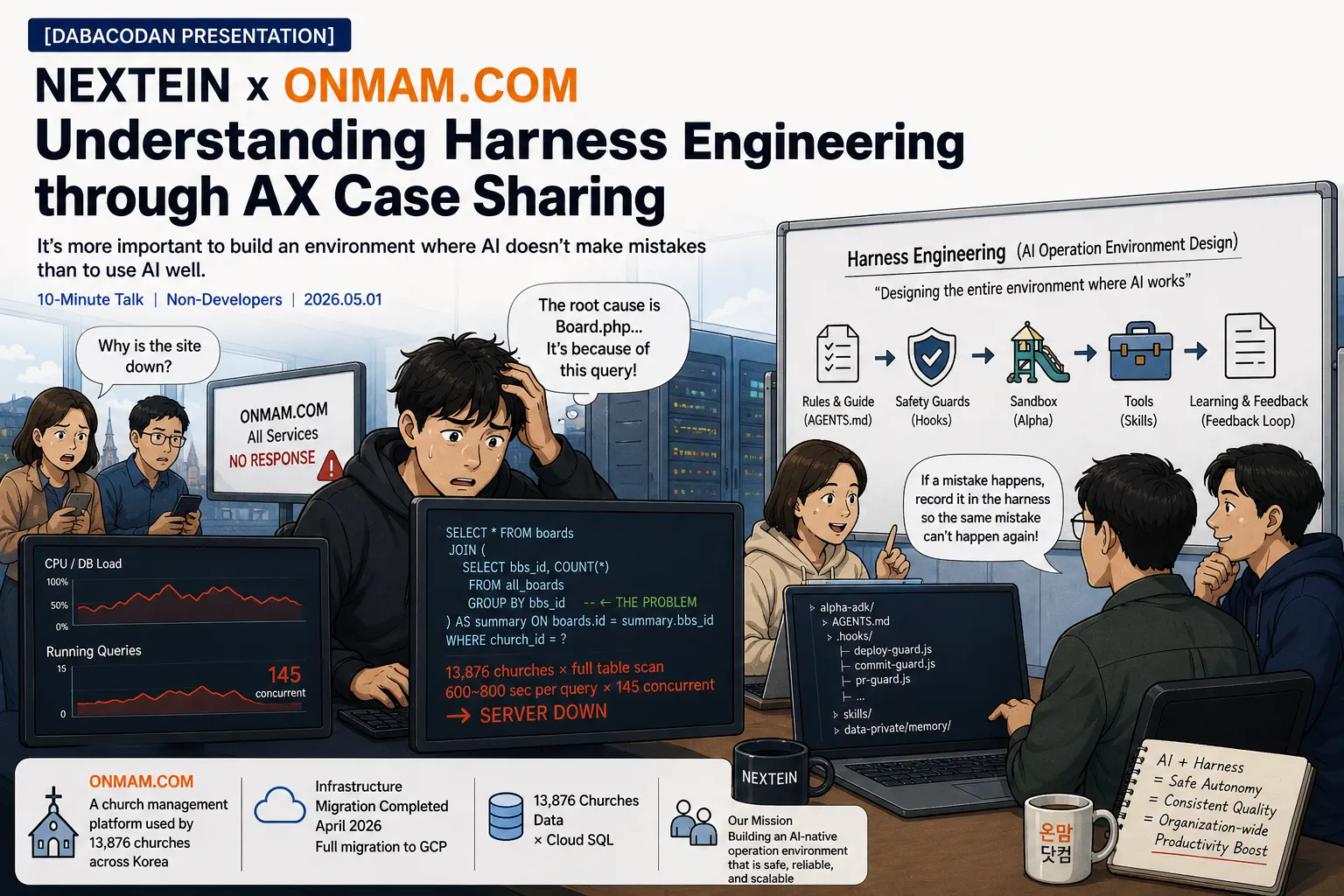
One-line message of this post "It's more important to create an environment where AI doesn't make mistakes than to use AI well."
1. First, an Introduction to Our Service
Onmam.com — A church management platform used by 13,876 churches nationwide
www.onmam.com      ← Find churches, member portal
home.onmam.com     ← Channel app (content/payment)
{church_name}.onmam.com ← Individual church homepage
Infrastructure: Old IDC servers → Complete migration to GCP (Google Cloud) in April 2026 DB: 13,876 church data sets × Cloud SQL
2. Let's Start with an Incident
"One Day in April 2026"
11 AM. Suddenly, the entire Onmam.com service became unresponsive.
Users: "Why is the site not working?"
Tracing the cause led to — the bulletin board list query code in a file named Board.php.
-- Problematic query (simplified)
SELECT * FROM boards
JOIN (
  SELECT bbs_id, COUNT(*) FROM all_boards GROUP BY bbs_id  -- ← This was the problem
) AS summary ON boards.id = summary.bbs_id
WHERE church_id = ?
This single query was full-scanning the entire data of 13,876 churches every time. When traffic surged, 145 queries, each taking 600-800 seconds, executed concurrently → complete server paralysis.
What does this have to do with AI?
The original author of this code was likely a human developer. However, today's developers write such code with AI.
The problem is — AI doesn't know "how this code will perform in an environment with 13,876 churches." AI focuses on implementing the requested functionality and doesn't understand the context of our service.
So, developers started to ponder: "How do we prevent AI from writing code without understanding our service?"
3. Harness Engineering — 30-second Explanation
Just as a bridle and harness are needed to control a horse,
AI agents also need constraints, guidance, and validation mechanisms.

Agent = Model + Harness
Harness = Designing the entire environment in which AI operates
It's not just about "asking AI good questions." Designing a system that structurally prevents AI from making the same mistake when it errs.
4. Harnesses Actually Built at Onmam.com
[Harness #1] AGENTS.md — "Our Service Map" for AI
alpha-adk/
├── CLAUDE.md        ← File AI must read when starting a session
├── AGENTS.md        ← List of project rules
└── .agents/
    └── context/
        └── agents-rules.json  ← Specific operational rules
Before AI touches Onmam.com's code, it must read these files. They contain information such as:
- "Testing and code modifications are to be done only in the alpha environment"
- "home.onmam.com is a separate channel app, not a portal"
- "GROUP BY derived table patterns in Board.php are strictly forbidden"
That outage from before? Now, if AI tries to create the same pattern, it will stop upon seeing this rule.
[Harness #2] Hooks — "Safety Devices" that Operate Before and After AI Actions
Hooks currently active in this workspace:
Just before AI executes a Bash command →
  ✓ pr-guard.js          : Blocks PR merges without review
  ✓ commit-guard.js      : Blocks commits that violate rules
  ✓ deploy-guard.js      : Blocks deployment to production servers without approval
  ✓ git-push-guard.js    : Blocks unauthorized git pushes
  ✓ destructive-git-guard.js : Blocks destructive commands like git reset --hard

Just before AI modifies a file →
  ✓ prod-gateway-guard.js : Blocks the use of production API keys in dev environment files
  ✓ design-doc-guard.js   : Blocks unauthorized modification of design documents

Immediately after AI modifies a file →
  ✓ cascade-check.js      : Checks for files that are cascade-affected by the modified file
deploy-guard.js real-world example:
AI attempts to execute a production deployment command:
  $ gcloud run deploy onmam-web ...

→ [Harness] Production deployment command blocked: gcloud run deploy
  Project: onmam-web
  Production deployment requires prior approval.
  Approval method: Add an approval entry to .claude/deploy/approvals.json
  AI does not directly execute production deployments.
Even if AI tries to deploy something to the production server by mistake or too aggressively, it is physically blocked.
[Harness #3] Alpha Environment — AI's Dedicated Playground for Experimentation
Production    : www.onmam.com         ← Used by actual churches
Staging       : staging.onmampick.org ← Final verification before deployment
Alpha         : luke-*-alpha.onmampick.org ← Workspace for collaboration with AI
Rule: All work with AI is done only in alpha.
Why this is important — What actually happened on April 29, 2026:
AI mistook
home.onmam.comfor theportalapp and wrote incorrect vhost settings. Because it was the alpha environment → no impact on actual service. This mistake was recorded in AGENTS.md → AI will not make the same mistake again.
The essence of harness engineering lies here: When a mistake occurs → it's recorded in the harness → making that mistake structurally impossible next time.
[Harness #4] Skills — "Our Own Tools" for AI
skills/
├── email/          ← Email sending (includes recipients, SMTP rules)
├── sms/            ← SMS sending
├── web-monitoring/ ← Service status monitoring
└── service-management/ ← Service operation commands
If AI is asked to "send an email" — it reads this skill file and automatically knows to whom, in what format, and via which SMTP it should send it. There's no need to ask "What's the recipient's email address?" every time.
5. Why Developers Are Interested in This
"Problems in the Era of Development Without AI"
Reliance on individual developer capabilities → quality declines if seniors leave
Must be caught by code review → requires human inspection
"Problems for Teams with AI but No Harness"
AI generates code quickly but → doesn't understand our service context
Repeats the same mistakes → AI creates bugs, humans fix them
AI can directly access production servers → unknown when an incident might occur
"Teams with AI + Harness"
AI writes code knowing our rules → context-aware generation
Mistakes recorded in harness → structural prevention of same mistakes
Production access approved by humans → safe autonomy
To borrow an expression from Toss:
"Harnesses raise the floor of overall organizational productivity. Without relying on individual capabilities, all team members achieve a certain level of results or higher."
6. Summary — What I Want to Convey to Non-Developers
In the age of AI, the definition of "doing well" is changing.
Before: Developers who write good code Now: Developers who design the environment for AI to write code well
The core of that environment design is harness engineering.
And this isn't just a story for developers.
Harnesses that non-developers can also implement:
  → Clearly documenting business rules
  → Defining for AI "what is allowed and what is not"
  → Recording "why AI made a mistake" when it happens

= This itself is the beginning of harness engineering
Onmam.com Harness Structure at a Glance
alpha-adk/
├── CLAUDE.md                    ← [Guide] Essential reading at AI session start
├── AGENTS.md                    ← [Guide] Project rules (SoT)
├── .agents/context/
│   └── agents-rules.json        ← [Guide] Specific operational rules
├── .claude/
│   ├── hooks/
│   │   ├── deploy-guard.js      ← [Sensor] Blocks production deployment
│   │   ├── prod-gateway-guard.js← [Sensor] Blocks production API keys
│   │   ├── commit-guard.js      ← [Sensor] Validates commit rules
│   │   ├── pr-guard.js          ← [Sensor] Enforces PR approval
│   │   ├── session-inject.js    ← [Sensor] Injects context into each session
│   │   └── cascade-check.js     ← [Sensor] Checks for cascade effects after modification
│   └── settings.json            ← [Permission] Hook execution settings
├── skills/
│   ├── email/                   ← [Tool] Email sending skill
│   ├── web-monitoring/          ← [Tool] Service monitoring
│   └── service-management/      ← [Tool] Service operation commands
└── data-private/memory/         ← [Feedback Loop] Records mistakes → prevents recurrence
    ├── project_onmam_incidents.md    ← Records Board.php outage pattern
    ├── project_onmam_app_structure.md← Records home≠portal mistake
    └── feedback_alpha_only.md        ← Records alpha-only rules
Harness = A collection of these files All are committed to the git repo. All of the team's context! is accumulated as code.
